

Wiring
The rear panel has two pairs of RJ11 connectors: PHONE SET/LINE 1 and PHONE SET/LINE 2.These connect to the telephone pairs (POTS lines) and their associated phones. The phones operate normally while the lines are not engaged by the HL240-VQ (OFF mode). When a line is engaged (ON mode), it disconnects from the phone. The lines can come from a public telephone exchange or a private branch exchange (PBX).
Using a PBX reduces the hybrid’s rejection performance, so it’s recommended to connect the HL240-VQ directly to public exchange lines.
Protection Features
- The telephone hybrid includes internal RF rejection filters for AM, VHF, and UHF bands.
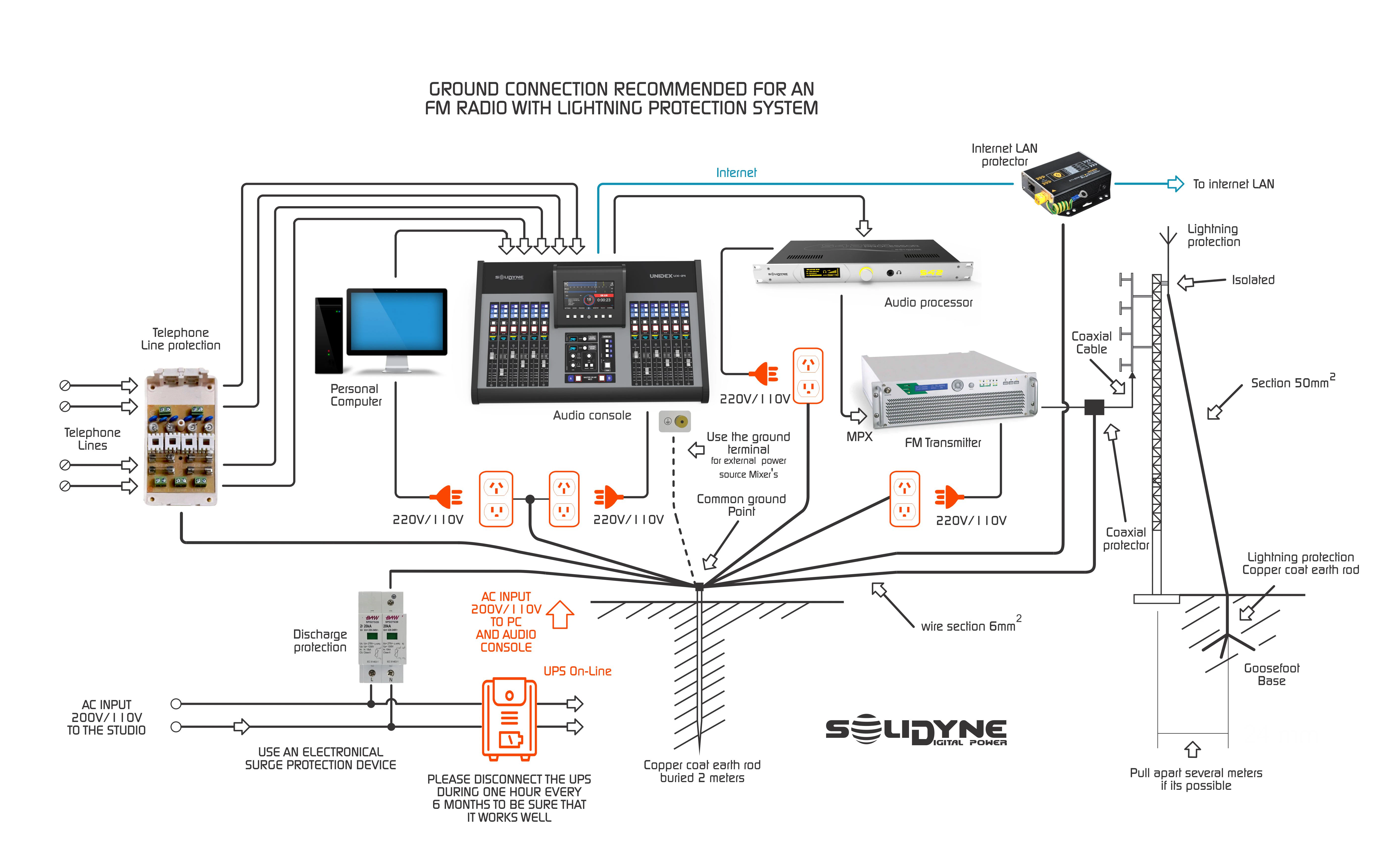
- Phone line connections are protected against high-voltage surges (indirect lightning strikes or power surges) using metal oxide varistors, capable of withstanding overvoltages up to 2 kV.
- If using ADSL lines (with Internet signal), ensure you have the corresponding RF filter provided by your Internet service provider (ISP).
Recomendación general para puesta a tierra y protecciones
Rejection Factor Adjustment
The telephone hybrid rejection adjustment applies only to analog land lines (POTS).Its function is to minimize the return of local signal that comes back through the line.
On an analog line, local sources (studio microphones) and audio from the other end are mixed on the same pair of wires.
The telephone hybrid separates both signals, but the separation is never complete: a small portion of the audio sent to the line returns to the console.
The telephone hybrid separates both signals, but the separation is never complete: a small portion of the audio sent to the line returns to the console.
The rejection is factory-adjusted with standardized impedances, but it needs to be readjusted for each installation. The NULL-1 and NULL-2 controls (rear panel) allow calibration of the rejection for each line. Procedure:
1
Establish call
Use the associated phone and make a call (to another land line (POTS) or to a mobile phone).
2
Inject reference tone
Press the AUDIO TONE button. A tone will be injected into the line.
This tone does not interrupt the signal sent from the console, so the send should be muted.
This tone does not interrupt the signal sent from the console, so the send should be muted.
3
Adjust rejection
Turn the NULL control (multi-turn) in both directions, observing the OUTPUT LEVEL indicator.
Find the position with the lowest signal level.
Find the position with the lowest signal level.
4
Optional monitoring
Listen to the variation of the residual tone using headphones connected to the HEADPHONES output or monitor from the console.
5
Repeat for other line
Perform the same adjustment for the second line.
Priority System
The priority system applies only to land lines (POTS).When local signal (studio microphones) is detected, the audio from the phone line is attenuated by 10 dB. This system has two purposes:
- Give priority to the studio host in a debate: if both speak simultaneously, the studio voice prevails.
- Improve local voice quality by reducing residual signal that the telephone hybrid fails to reject.
- Avoid using background music (beds), or keep it at very low level, as it may trigger the priority system and attenuate incoming audio.
- During interviews and dialogues, the priority system operates naturally and remains imperceptible to listeners.
- In special applications (e.g., contests where listeners must identify a song), the attenuation may be undesirable.
In these cases, using mobile phones via Bluetooth is recommended.