

Analog Inputs and Outputs
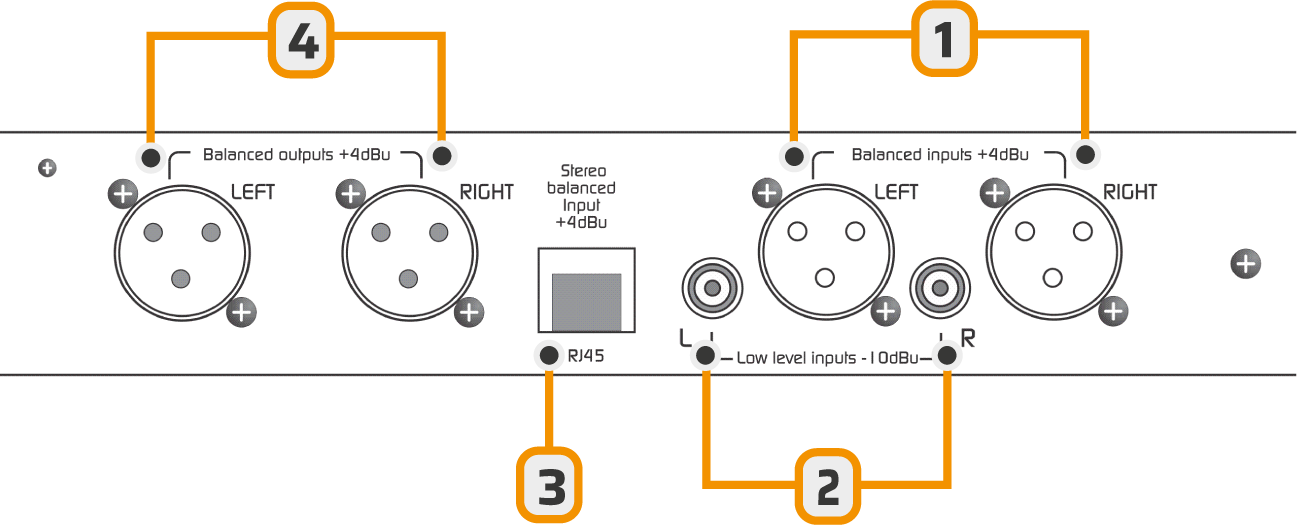
The XLR connection is standard: shield to pin 1, inner conductors to 2 (signal +) and 3 (signal –)
Digital Input/Output via USB
The Audimax 362HD/USB model includes an optional module for sending and receiving audio via a standard USB A/B cable connection to a PC.- When connected to a Windows© computer, the system automatically recognizes the processor and installs the necessary drivers.
No additional drivers are required. - The unit is recognized as a stereo audio card:
- USB playback device → corresponds to the audio input to the processor.
- USB capture device → corresponds to the audio output from the processor.
About USB Detection
- Before connecting the USB port, ensure that the console and the PC are properly grounded through three-prong power plugs.
Verify with a tester (25 V AC scale) between the PC chassis and the console chassis.
The reading should be 0 V. Otherwise, the USB input of the processor or the computer could be damaged.
The reading should be 0 V. Otherwise, the USB input of the processor or the computer could be damaged.
- Avoid changing USB port cables, as Windows may reassign the order of devices.
HD Mode (High Definition)
The HD mode is designed for audio applications where the FM stereo encoding stage (MPX) is not used.- Fully digital stations (HD Radio and streaming).
- Sound reinforcement applications (small venues, auditoriums, shopping centers).
- The FM emphasis network is deactivated (and therefore the de-emphasis of the audio outputs).
- A fast-acting limiter is enabled on the outputs.
- The MPX outputs are deactivated.
Enable HD Mode
To change the operating mode, it is necessary to access the internal micro-switches by removing the top cover of the unit.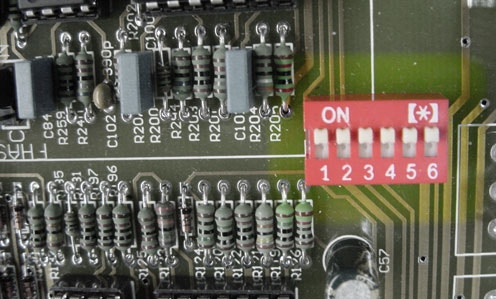
- All switches ON = FM Mode
- All switches OFF = HD Mode
- Lit = FM
- Off = HD
The unit is factory-configured in FM mode.