

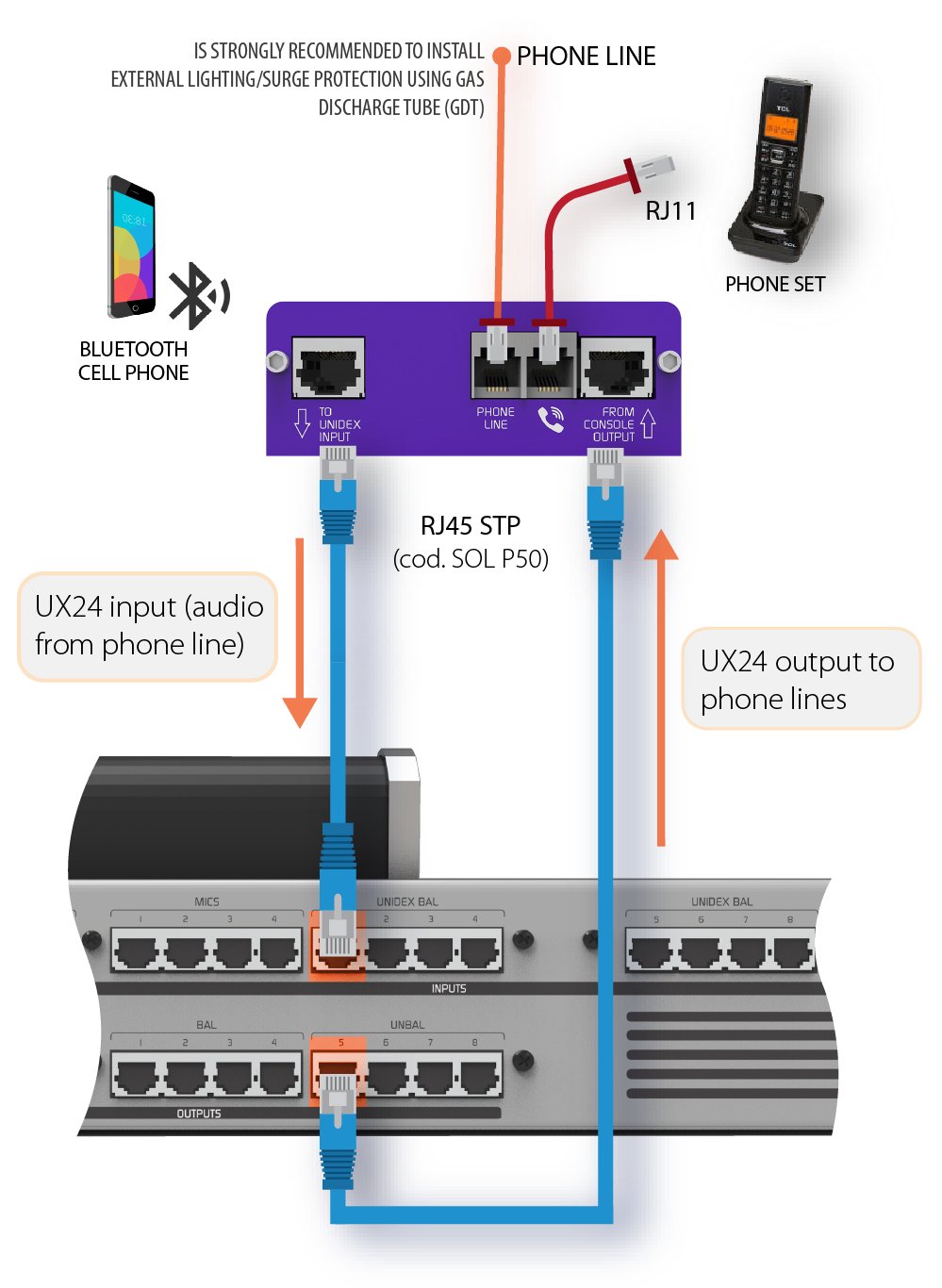
- The UDX TEL+BT adapter provides connection for a land line (POTS) and Bluetooth pairing for a mobile phone.
- It connects directly to the rear panel of UNIDEX with two SFTP RJ45-RJ45 cables (e.g. Solidyne code SOL P50).
- It is controlled from the console surface or remotely via the WEB Control interface.
- The UDX TEL+BT adapter provides connection for a land line (POTS) and Bluetooth pairing for a mobile phone.
- It connects directly to the rear panel of UNIDEX with two SFTP RJ45-RJ45 cables (e.g. Solidyne code SOL P50).
- It is controlled from the console surface or remotely via the WEB Control interface.
Input to output routing (mix-minus mode)
Configurations
Once the UDX 2TEL adapter is connected, configure:- Inputs
- Outputs (sends)
- Channels
Configure Inputs
- On the main screen, access the
SETTINGSoption. - Turn the encoder until selecting the UNIDEX input where UDX TEL+BT is connected. If the input is currently configured as
MONO, you will be able to select “L” and “R” individually. - If it is configured as
STEREO, the L/R pair will be selected. In this case, changeINPUT MODEtoMONO.The “L” input corresponds to Bluetooth.
The “R” input corresponds to the land line (POTS). - Select the “UDX L” input. In the
UDX TYPEoption, chooseTEL+BT. - Tap the screen to display the
ASSIGNED TO CHANNELmenu to assign a CHANNEL to Bluetooth. If you choose a channel that already has an input assigned, a warning will appear. If you continue, the input on that channel is replaced. - Repeat from Step 4 for the “UDX R” input and assign a CHANNEL to the land line.
- Press
BACKto return to the main screen. - The next step will be to configure the output.
Configure Outputs
- From the main screen, access the
SETTINGSoption. - In
SETTINGS, select theOUTPUTSoption. - Using the encoder, select the output to which the UDX TEL+BT is connected. If the output is currently in
MONOmode, you can individually selectOUT-LandOUT-R. - If configured as
STEREO, the L/R pair will be selected. In this case, change theAUDIO MODEtoMONO.The “L” output is the Bluetooth send.
The “R” output is the phone line send. - Select
OUT-Land setSEND MODEtoMIX-MINUS. When activatingMIX-MINUS, the output will be associated with its corresponding UNIDEX input. - Repeat the operation for
OUT-R.
Channel Configuration
- On the main screen, press
CHANNEL. TheCUEbuttons will switch toSELECTmode. - Press the
CUE/SELECTbutton for the channel you want to configure. The console will exitSELECTmode and display theCHANNELscreen for the selected channel. - Under the
MODEoption, open the menu and selectTELCO. This will display the channels on the TELCO screen for call management. - To edit the label, tap on the name. An on-screen keyboard will appear for text editing.
- Verify that the output assignment matches the UNIDEX input being used, and that the mode is set to MIX-MINUS.
- Press
BACKto return to the main screen.
Configurations
Once the UDX 2TEL adapter is connected, configure:- Inputs
- Outputs (sends)
- Channels
Configure Inputs
- On the main screen, access the
SETTINGSoption. - Turn the encoder until selecting the UNIDEX input where UDX TEL+BT is connected. If the input is currently configured as
MONO, you will be able to select “L” and “R” individually. - If it is configured as
STEREO, the L/R pair will be selected. In this case, changeINPUT MODEtoMONO.The “L” input corresponds to Bluetooth.
The “R” input corresponds to the land line (POTS). - Select the “UDX L” input. In the
UDX TYPEoption, chooseTEL+BT. - Tap the screen to display the
ASSIGNED TO CHANNELmenu to assign a CHANNEL to Bluetooth. If you choose a channel that already has an input assigned, a warning will appear. If you continue, the input on that channel is replaced. - Repeat from Step 4 for the “UDX R” input and assign a CHANNEL to the land line.
- Press
BACKto return to the main screen. - The next step will be to configure the output.
Configure Outputs
- From the main screen, access the
SETTINGSoption. - In
SETTINGS, select theOUTPUTSoption. - Using the encoder, select the output to which the UDX TEL+BT is connected. If the output is currently in
MONOmode, you can individually selectOUT-LandOUT-R. - If configured as
STEREO, the L/R pair will be selected. In this case, change theAUDIO MODEtoMONO.The “L” output is the Bluetooth send.
The “R” output is the phone line send. - Select
OUT-Land setSEND MODEtoMIX-MINUS. When activatingMIX-MINUS, the output will be associated with its corresponding UNIDEX input. - Repeat the operation for
OUT-R.
Channel Configuration
- On the main screen, press
CHANNEL. TheCUEbuttons will switch toSELECTmode. - Press the
CUE/SELECTbutton for the channel you want to configure. The console will exitSELECTmode and display theCHANNELscreen for the selected channel. - Under the
MODEoption, open the menu and selectTELCO. This will display the channels on the TELCO screen for call management. - To edit the label, tap on the name. An on-screen keyboard will appear for text editing.
- Verify that the output assignment matches the UNIDEX input being used, and that the mode is set to MIX-MINUS.
- Press
BACKto return to the main screen.
Pairing UDX TEL+BT with a mobile phone
OPERATION→ TELCO - Communications in UX24
Connecting UDX TEL+BT to a Phone Line
The steps to connect the land line (POTS) are:- Connection to the phone line.
- Connection of an associated phone.
- Adjustment of the rejection factor.