Streaming Services Summary
The UX18 consoles can generate two independent audio streams and decode one incoming audio stream.- Streaming 1 (outgoing)
Uses the RTP protocol, ideal for a link to the transmitter site (STL). - Streaming 2 (outgoing)
Compatible with Shoutcast/Icecast servers for internet broadcasting. - Streaming 3 (incoming)
Can be RTP or a public HTTP stream.
When this function is enabled, the received audio is automatically decoded and switched, replacing the AES-1 input. - Remote monitoring: The UX18 incorporates a WebRTC service that allows you to listen to the audio remotely from the WEB Control Interface, whether accessed locally or externally via the Internet.
Streaming Services Configuration
This is done from the SETTINGS screen, under the STREAMING option. It requires the ADMIN profile.STREAMING launches the Streaming Interface Access screen. It displays a summary of the status of audio transmission and reception streams, and allows access to other configuration instances:
- STREAM CFG → Access to the streaming services configuration.
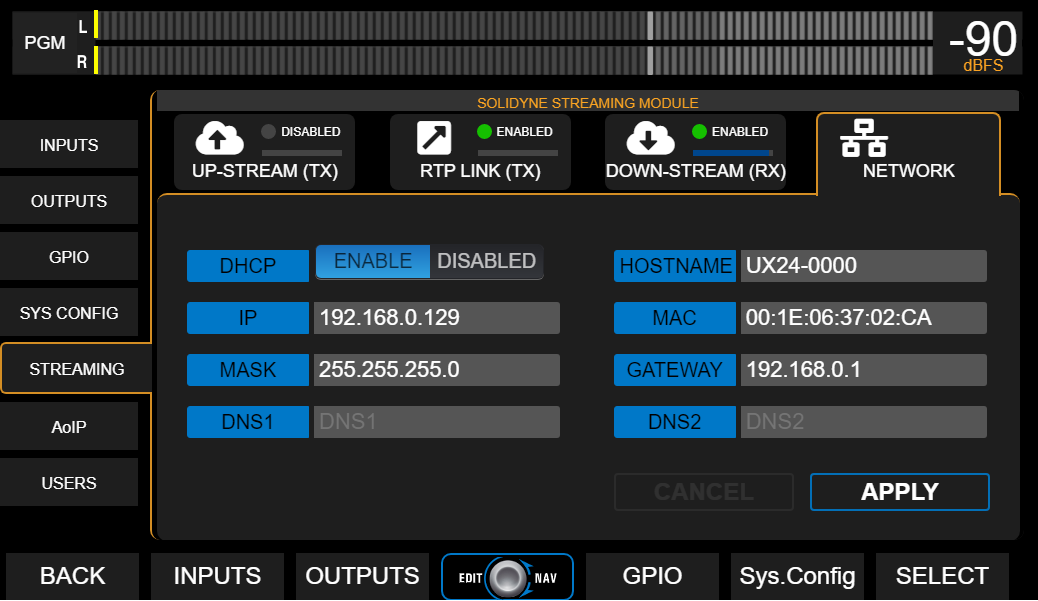
- SYSTEM → Access to the LAN configuration for the UX18’s streaming services
(not to be confused with the WEB remote control LAN configuration).
UP-STREAM (TX) - Icecast/Shoutcast
The UP-STREAM tab allows you to configure an Icecast or Shoutcast type broadcast server to publish the program signal.- RUN/STOP: Enables or disables sending the streaming when changes are confirmed by pressing APPLY.
- PROTOCOL: Defines whether the server is Icecast or Shoutcast type.
- SERVER IP: Destination IP address of the server.
- PORT: TCP listening port of the server.
- MOUNTPOINT: Unique name that identifies the stream on the server.
- Stream NAME: Name that identifies the stream.
- PASSWORD: Access key for publishing (if applicable).
- CODEC: Audio transmission format (Opus or MP3).
- QUALITY: Bit rate for encoding.
- APPLY: Applies and saves the changes and starts or stops the broadcast (according to the RUN/STOP state).
The configuration parameters for Icecast/Shoutcast are provided by the server provider.
Audio Processing for Streaming
Pressing the PROCESS icon accesses the audio processor, which includes level normalization and bass enhancement. This processing only affects the streaming for Icecast/Shoutcast.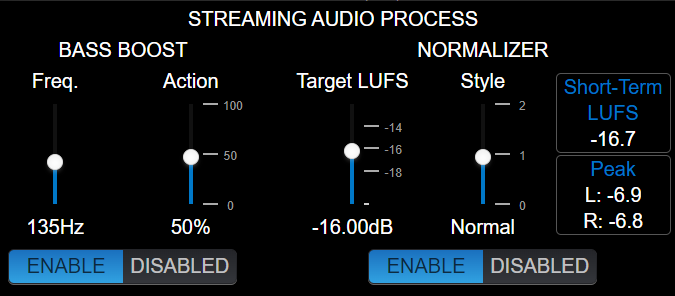
Normalizer
Reduces the signal’s dynamic range and adjusts the level to a constant value, achieving a more consistent sound without volume jumps.- Target LUFS: Determines the target level for the streaming signal (± 1 LU).
It is adjusted based on the content type:- -21 to -19 LU → Signals with large level variations, without prior control (example: uncompressed microphones).
- -18 to -15 LU → Mixed music and speech signals, using compressors on the microphone channels to limit the dynamic range.
- -14 to -12 LU → Signals already heavily compressed (music).
- Style: Defines the normalizer’s action times.
Possible values: slow, normal, fast.- Slow: recommended when there are large volume variations.
- Fast: useful for normalizing previously compressed signals.
Bass Boost
Applies a bass boost to the streaming signal.- FREQ. → Cutoff frequency; the boost is applied below this frequency.
- ACTION → Adjusts the amount of boost applied.
RTP LINK
The RTP LINK tab allows you to configure the streaming output to a specific IP address, for example, to send the program signal to a transmitter site (STL).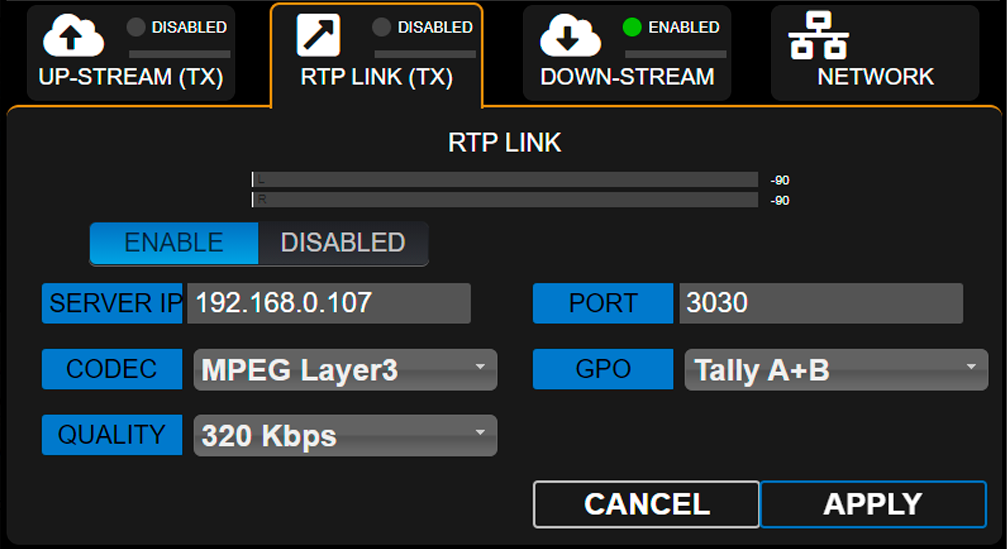
- ENABLE/DISABLED: Enables or disables RTP streaming when changes are confirmed by pressing APPLY.
- DESTINATION ADDRESS: Destination IP address.
- PORT: TCP transmission port.
- CODEC: Audio format for RTP (PCM / MP3).
- QUALITY: MP3 bitrate or PCM sampling frequency.
- GPO: Enables sending Tally Light signals via TCP/IP for compatible Solidyne equipment.
- Studio A and B (lines 1 and 2 respectively)
- Studio B and A (reversed order)
- A+B (the signal is activated on both lines, whichever studio is active)
Down-Stream (RX)
Allows configuration of an incoming stream. When the DOWN-STREAM module is active, the decoded audio is sent internally to the AES-1 input, which is renamed to STREAM-1.In this mode, the AES-1 connector on the rear panel is disabled.
- RUN/STOP
Starts or stops the stream decoding when changes are confirmed with APPLY. - PROTOCOL
Defines the type of incoming stream. The following formats are supported:- Public HTTP and MMS streams encoded in PCM 16 (44.1/48 kHz), MP3, or Opus.
- RTP streams in PCM 16 (44.1 kHz) and MP3.
- SERVER URL/IP
Name or IP address of the server generating the stream. - PORT
TCP port through which the stream enters.
Default value: 0. - MOUNTPOINT
Unique name identifying the stream. - APPLY
Applies the configuration changes.
Step-by-step Download a step-by-step guide for configuring an incoming stream.
REMOTE PLAYER
The WEB Remote Control Interface allows listening to the console’s audio via a WebRTC service.Audio Format
- Encoding: Opus
- Configurable bitrate: 128 to 320 kbps
Operation on the local network
When accessed from a terminal on the LAN, no advanced configuration is required.The remote player will play the audio directly over the local network.
Operation via Internet
To access audio from the WEB Control Interface over the Internet, the network must implement:- Symmetric NAT
- TURN server
If these services are not available, a warning message will appear in the player.
SERVICES CFG
The Services Configuration screen allows you to assign audio sources to the streaming services.Operational Notes
- The ENABLE column allows you to start or stop each service.
- It is recommended to keep stopped any services that are not in use to optimize system resources.
Streaming System
General network settings for the Streamer UX18 module (do not confuse with the web control access).