

About the Programming Schedule
Commercial breaks and program blocks are created separately and stored in different files:.LOGfor commercial breaks..PGMfor program blocks.
Program blocks are defined in CyberPlay Editor across different time slots: live programs, AutoDJ, pre-built playlists, satellite feeds, etc. Breaks and blocks are created using AUDICOM-specific commands. There’s no need to memorize them: wizards (e.g., Magic Programming) and visual editing tools streamline scheduling.
Overview
Enter the AUDICOM desktop and open CyberPlay Editor from the dropdown menu.Requires permission in your user profile (see Access Levels). AUDICOM builds the schedule from:
- .LOG (commercial breaks)
- .PGM (music blocks, live broadcasts, satellite feeds, etc.)
Many commands can be managed graphically from CyberPlay-Test or with assistants like Magic Programming.
Instructions for Scheduling Content
Below are the commands or instructions that generate the different content blocks. Instructions begin with / (slash) unless otherwise specified.Each instruction must be on a single line.
- The first block must start at 00:00 and the last must end at 24:00.
- Uppercase/lowercase does not matter.
- If there is a time slot without a block, CyberPlay will display a gray block labeled EMPTY.
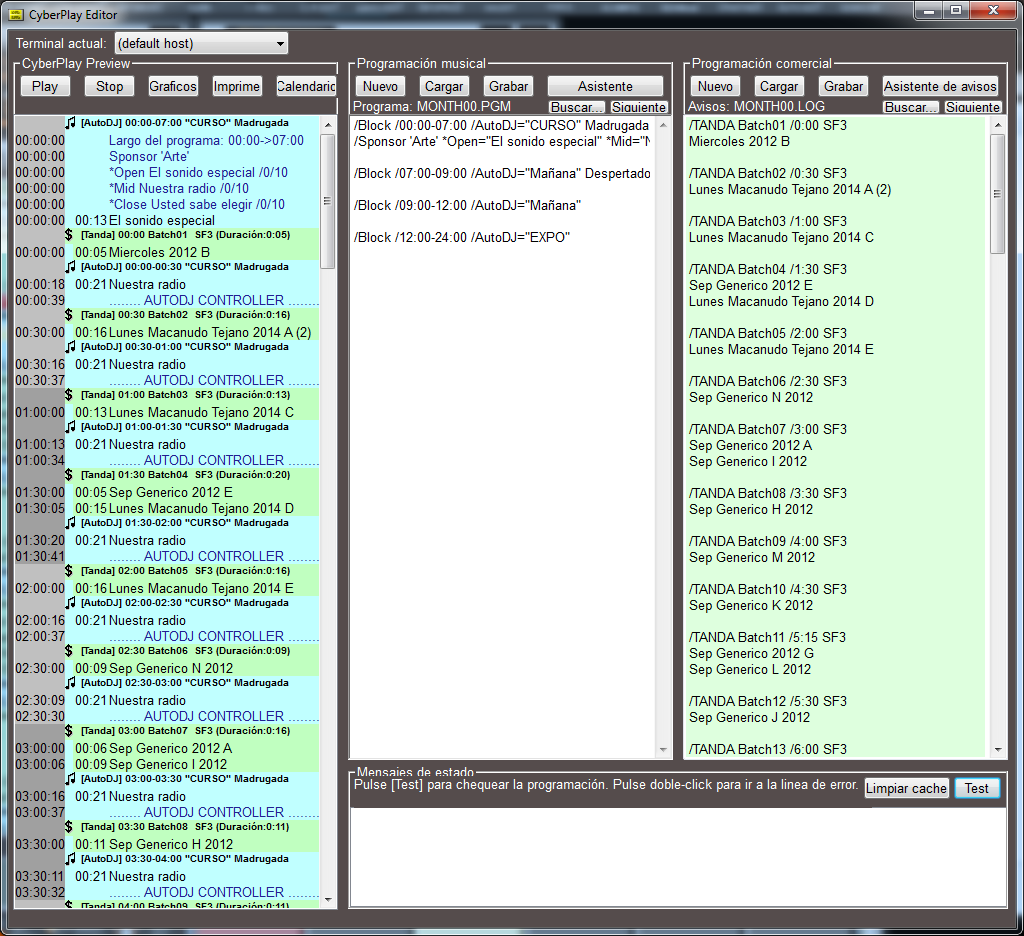
LOG and PGM Files – Programming Schedule
The broadcast dates for commercial blocks (.LOG) and programs (.PGM) can be defined as follows:- For a specific date (e.g., 1998-12-25).
- For a weekday in a month (e.g., all Mondays in April).
- For a fixed weekday (e.g., every Monday of the year).
- For a month (e.g., August).
- For an entire year.
Priority order when loading PGM/LOG
When the CyberPlay on-air module builds the schedule, it loads PGM and LOG following this order:YYYYMMDD.LOG/YYYYMMDD.PGM
Year-Month-Day (e.g.,20040501) for May 1, 2004.WED11.LOG/WED11.PGM
All Wednesdays in November.SUN00.LOG/SUN00.PGM
Any Sunday of the year (the00indicates “all”).MONTH04.LOG/MONTH04.PGM
All of April.MONTH00.LOG/MONTH00.PGM
Every day of the year.
Abbreviations: SUN Sunday, MON Monday, TUE Tuesday, WED Wednesday, THU Thursday, FRI Friday, SAT Saturday, MONTH Month.
Programming in the On-Air Manager
The On-Air module loads the schedule for the next day each day using LOG/PGM files and the previous priority order. For example, on 08/14/2005 it may load980814.LOG (daily spots) and MONTH08.PGM (monthly blocks for August).
The automatic loading occurs at 18:00 (configurable in the Control Panel).
If any of these are modified:
- Current day’s files
- Next day’s files after the automatic reload time
Perform regular backups of
If these are accidentally deleted, the programming schedule will be lost.
C:\Audicom\LOG and C:\Audicom\PGM (default locations).If these are accidentally deleted, the programming schedule will be lost.