

Connecting a Mobile Phone via Bluetooth
The MX2100 supports connecting a mobile phone via Bluetooth, for transmission to studios or to add a mobile phone to the broadcast when the link is made from an external computer or land line (POTS).- Compatible with any phone with Bluetooth.
- Eliminates dependence on hands-free cables, which vary by brand and model.
- Maximum distance: up to 5 meters; recommended: keep the mobile phone on your person but separate from the console (shirt pocket or belt on the opposite side).
- Advantage: the signal remains digital from the mobile phone to inside the MX2100, achieving better audio quality.
Pairing a Mobile Phone to the Console
The initial pairing only needs to be done once per phone. After that, the connection is automatic when Bluetooth is activated on both devices.1
Turn off Bluetooth on the console
Verify that the Bluetooth LED (located on the DTMF keypad) is off.
- If it flashes green every 2 seconds → it is on.
- To turn it off: hold down the ”#” and “9” keys until the LED turns off.
2
Activate search mode on the console
With Bluetooth off, hold down ”#” and “9” for ~10 seconds until the LED flashes rapidly alternating green/red.
This indicates the MX2100 has entered search mode.
This indicates the MX2100 has entered search mode.
3
Search for devices on the mobile phone
On the phone, start a search for Bluetooth devices.
The procedure depends on the model; consult the mobile phone’s manual.
The procedure depends on the model; consult the mobile phone’s manual.
4
Select the console
The phone will display the device Solidyne BTM641 (on older models: BTM751).
- If it requests a PIN: enter 0000.
- The MX2100’s ID is stored in the mobile phone.
- The console’s LED changes to a slow green flash (one flash every 2 seconds), indicating an active connection.
On some phones, after detecting the device, it is necessary to press “connect” for it to become active. Others activate it automatically.
Reconnect Paired Device
To reconnect a previously paired mobile phone:1
Turn on Bluetooth on the console
Press “#” and “9” until the LED lights green (approx. 5 seconds).
2
Turn on Bluetooth on the phone
When the mobile phone confirms connection, it is ready to operate.
When making or receiving calls, the audio is sent to the console.
When making or receiving calls, the audio is sent to the console.
On some phones, reconnection is not automatic and the Solidyne BTM641 device must be manually selected from the list of Bluetooth devices.
Volume Adjustment
- Adjust the Bluetooth volume on the mobile phone to maximum, to achieve the best signal-to-noise ratio.
- The adjustment must be made during a call via Bluetooth.
- The phone’s volume is independent of the Bluetooth volume.
- The value is stored in the mobile phone’s memory.
- If you change phones, you must readjust the level to maximum.
Turn Off Bluetooth on the Console
To avoid battery consumption when not in use, turn off Bluetooth by holding down ”#” and “9” until the LED turns off completely.Mobile Phone Connection via Cable (Obsolete)
Mobile Phone Connection via Cable (Obsolete)
The RJ-11 “Cellular&Phone” connector allows connecting a mobile phone using a hands-free accessory.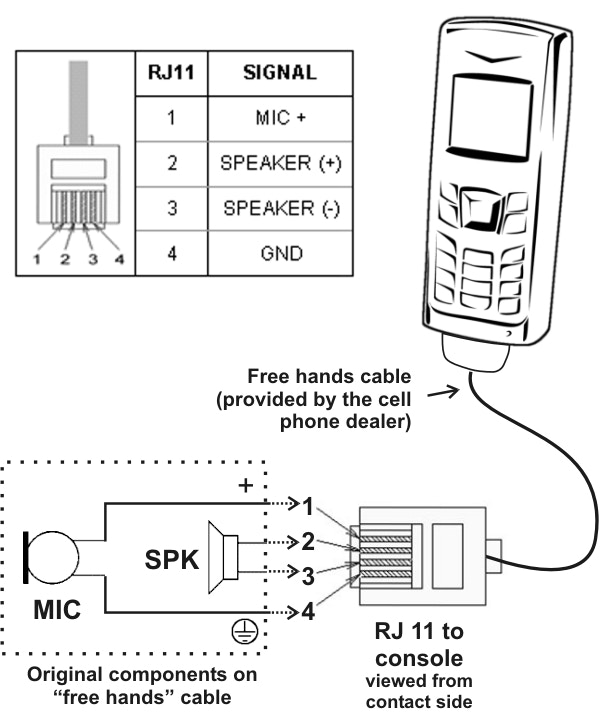
- It is used as a backup for the external computer link, especially when Bluetooth is in use to send another mobile phone on-air.
- The mobile phone transmits the microphone (tip of the miniplug) and speaker (ring) signals to the MX2100.
- The console sends the program signal to the mobile phone, which retransmits it to the radio.
- The return from the radio arrives at the mobile phone and from there to the console, integrating into the headphone mix (STUDIO).
- While using this connector, the mobile phone’s microphone and speaker are disconnected.
The connection cable varies depending on the mobile phone’s brand and model. It is necessary to acquire the specific “hands-free” accessory for each phone and follow the manufacturer’s documentation.