

Mobile Phone
- Via Bluetooth:
- From the mobile phone, call the radio station.
- Once the connection is established, use the microphones and headphones connected to the MX2100 to communicate with the studio.
- If the radio station calls the journalist, the ring is heard in the headphones and the call signal on the mobile phone.
- The call can be accepted from the mobile phone itself or by briefly pressing # 9 on the console.
- Via hands-free cable (deprecated):
- Place the call from the mobile phone.
- Once connected, press the PHONE button on the console.
- Connect the “hands-free” cable (already connected to the Cellular & Phone input of the MX2100) to the mobile phone’s connector.
- From this point on, the conversation is conducted using the console’s microphones and headphones.
To end the communication from a mobile phone, hang up and disconnect using the mobile phone’s keypad (refer to the phone’s manual).
Land line (POTS)
- Press the PHONE button to seize the line.
- Dial the radio station’s number using the console’s DTMF keypad.
- Once the connection is established:
- Speak from the microphones connected to the MX2100.
- Listen to the Studios in the headphones.
- The program signal (console output) is sent to the radio station via the line.
- To end the call: press the PHONE button again, which will return to its outward position, terminating the call.
- For incoming calls from the radio station:
- The incoming RING is heard in the headphones.
- The call is answered directly from the console.
If the communication is interrupted…
- Mobile phone:
- The mobile phone itself ends the call.
- The MX2100 operator can wait for the radio station to call back and answer from the mobile, or press # 9 on the console to answer.
- The link with the radio station is restored.
- Land line (POTS):
- If the call is dropped, release the ON-AIR button to initiate or receive the new communication.
- In case of an incoming call from the radio station:
- The RING is heard in the headphones.
- Answer directly from the console by pressing ON-AIR.
Diagram: Bluetooth Mobile Phone Transmission
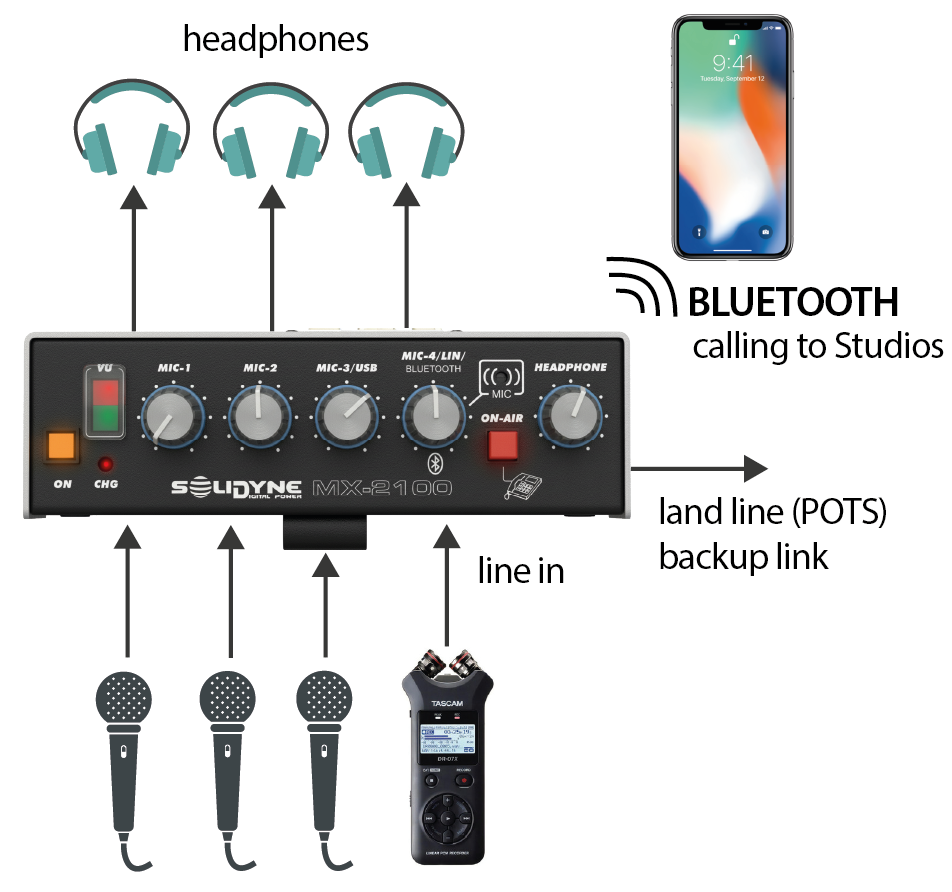
- The console transmits to the Studio using a mobile phone paired via Bluetooth.
- As a transmission backup, a land line (POTS) can be connected.
- The Studio return feed enters, via Bluetooth, directly into the headphone mix.
- The mix of up to three microphones and one line input (which allows connecting, for example, a portable recorder) is sent on-air.