

Case 1: Real-time remote mobile phone
About Transmission
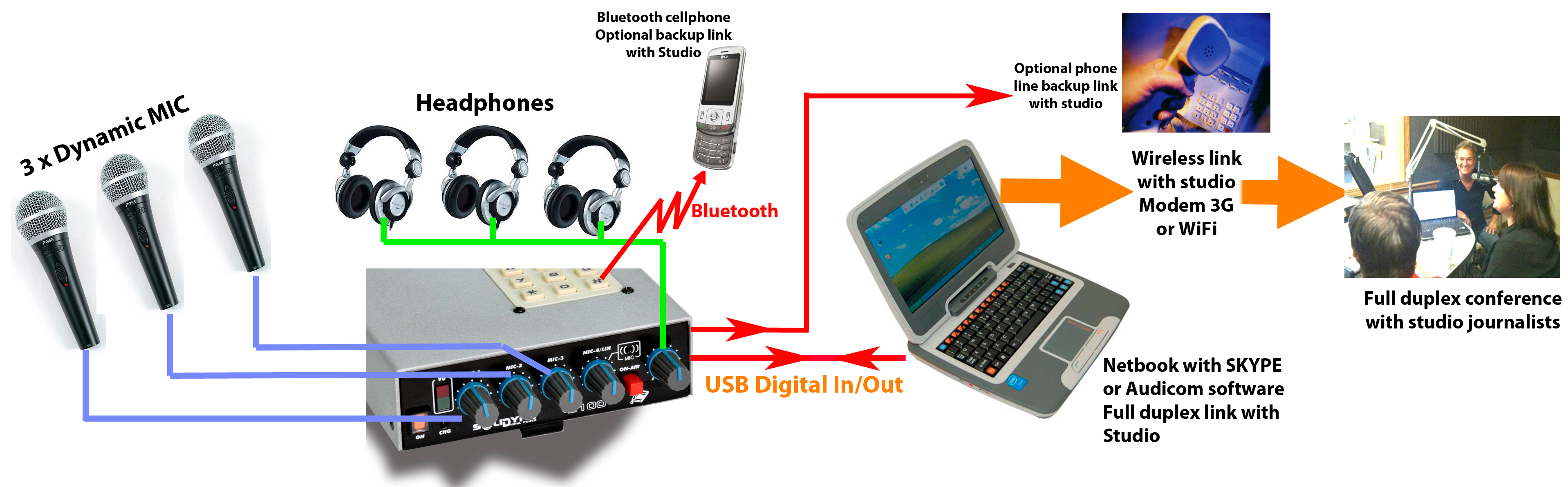
- Communication with the radio station is established from a USB-connected laptop to the MX2100.
- Alternatively, a Bluetooth-connected tablet or smartphone can be used.
- The mobile device uses a communications application, for example Skype®, to communicate with the Studios.
- Bluetooth or land line (POTS) connections to a mobile phone can be used as a backup for the Internet link.
If Bluetooth were to be used to communicate with the radio station in an emergency situation, the MIC-4/LIN/Bluetooth control must remain closed to avoid a feedback loop.
The Bluetooth return feed goes directly into the headphone mix.
The Bluetooth return feed goes directly into the headphone mix.
About Studio Return
- The mix generated in the console is sent via USB to the laptop, which transmits it to the Studios.
- From the laptop, the Studio return enters the console via USB, directly into the headphone mix.
- Connecting a microphone to the MIC-3 input triggers the USB return switching to the headphone mix.
- In headphones, the operator hears both the Studio return and the program mix (MIC-1, MIC-2, MIC-3).
In a bidirectional communication with Studios via the Internet, a microphone must ALWAYS be connected to the MIC-3 input. This ensures the USB return is routed to the headphones.
If a microphone is not connected to MIC-3:
If a microphone is not connected to MIC-3:
- The Studio return will not be heard.
- The USB signal on the MIC-3/USB control cannot be used, as it would send the Studio return on-air.
Case 2: Unidirectional High-Quality Communication
The diagram shows a scenario where the portable console operates as a remote studio, transmitting to the Main Studios via a high-quality audio streaming link.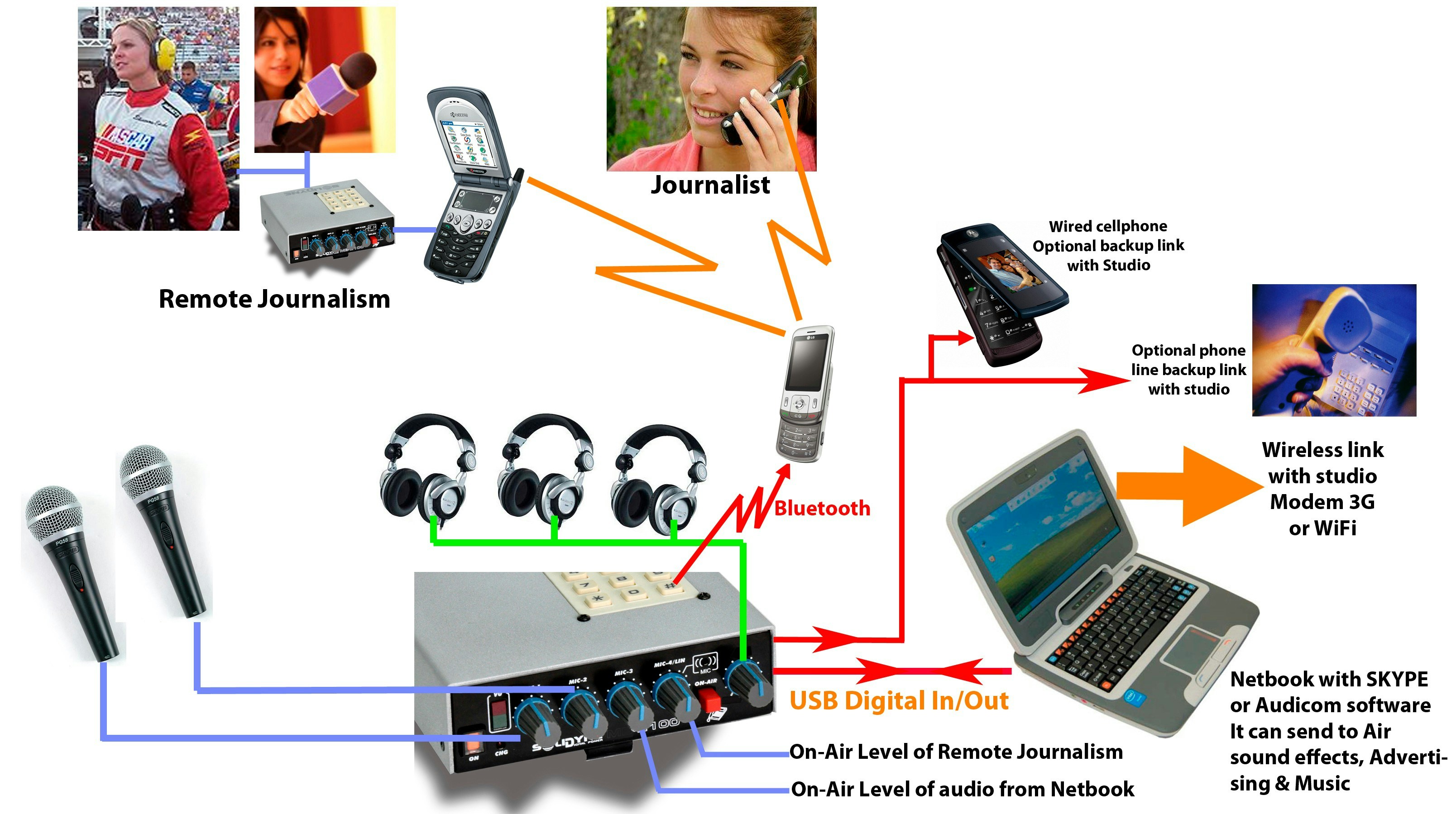
About Transmission
- The console connects via USB to a laptop with Internet access.
-
Communication with the Studio is established from the Netbook:
- Using Solidyne Audicom® to generate the streaming.
- Or any other compatible encoding software.
Skype® or other VoIP apps do not apply in this case, as they are only suitable for voice, while here high-quality stereo audio transmission is required. -
As a backup, the following can be used:
- A wired mobile phone.
- Or a land line (POTS) connected to the console’s RJ-11.
About Studio Return
- The unidirectional data flow allows sending audio in high quality, but it is not possible to communicate with the studio due to streaming delays.
- Under this condition, all signal is generated from the MX2100.
- If a return from the studio is mandatory, it is recommended to implement it via:
- Mobile phone (wired or via Bluetooth).
- The return is heard in headphones, without delay.
About the Signals That Can Be Handled
Microphones and Line Inputs- Available: MIC-1 and MIC-2.
- MIC-3 is left unconnected, to enable sending the USB input (audio from the computer) on-air.
Connecting a microphone to MIC-3 switches the USB return to the headphone mix, which corresponds only to the case of two-way communication with Studios.
- A mobile phone paired via Bluetooth allows putting a remote interviewee or journalist on-air (control MIC-4/LIN/Bluetooth).
- A second MX2100 can also be linked via mobile phone.
When the console is connected via USB (to a computer or charger), the internal microphone MIC-4 is disabled, and the Bluetooth return appears in its place.
This allows sending a phone call on-air when Bluetooth is not used to link the MX2100 with Studios (it is assumed the primary link is made by the computer).
This allows sending a phone call on-air when Bluetooth is not used to link the MX2100 with Studios (it is assumed the primary link is made by the computer).