

PROCESS SCREEN
To access, press PROCESS on the main screen. This also activates SELECT mode to choose a channel.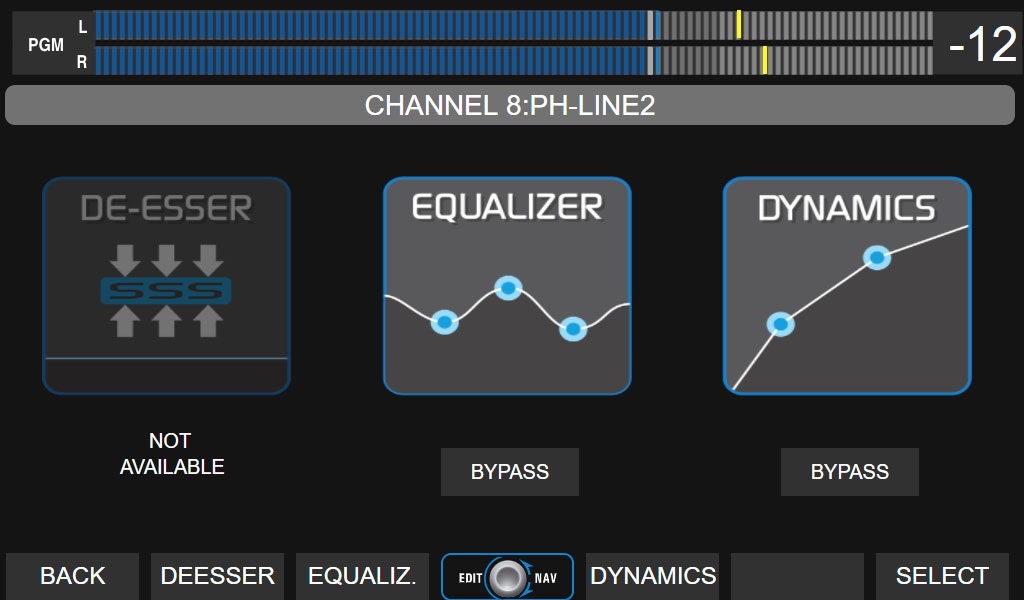
Functions of the PROCESS screen
- View which processors are on the channel and whether they are active or in BYPASS.
- Activate/deactivate a processor by touching BYPASS.
- Access its settings by touching the icon or the context button.
- In SELECT mode, use CUE/SELECT on the console or the encoder to scroll through the 24 channels (hardware channels in cyan, virtual channels in violet).
- Any action in PROCESS cancels SELECT, applying changes to the active channel.
- From PROCESS, you can also activate SELECT and choose another channel.
It is performed by combining the encoder and the touch options, as indicated for each processor.
The processor settings can be saved in the scene .
PARAMETRIC EQUALIZER
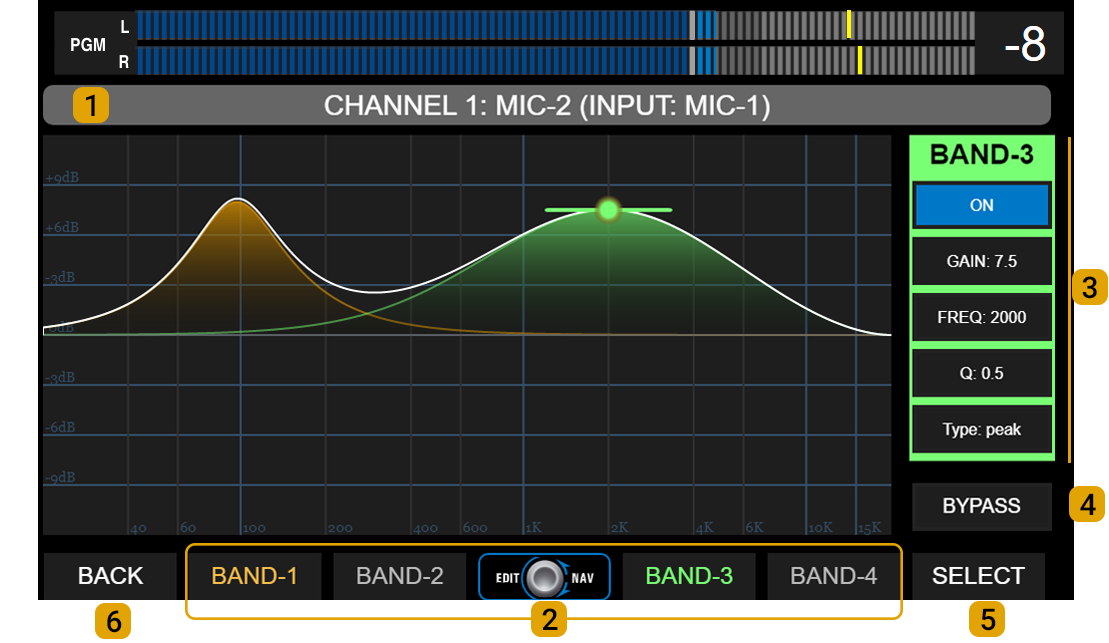
Each band has a color that identifies it in the graph and in the parameter area.
All inputs have 3 parametric bands, except for inputs MIC-1 to MIC-4 which have four bands. 3 - CONTROLS: Parameters for each EQ band. The background color changes with the selected band.
- GAIN: Gain in dB, with a range of ± 9 dB.
- FREQ: Adjusts the center frequency. All bands cover from 20 Hz to 20 kHz.
- Q: Width of the EQ bell curve. Determines the precision of the applied correction.
- TYPE: Band operating mode. Toggled by touching the TYPE option on screen.
- Band #1: peak, low-shelf, or HPF.
- Band #2 (and #3 on microphone inputs): peak or HPF/LPF.
- Band #3 (#4 on mic inputs): peak, hi-shelf, or LPF.
- ON/OFF: Turns the band on/off. Toggled by touching ON/OFF on screen.
Toggled by touching BY-PASS on screen. 5 - SELECT: Activates channel selection mode. 6 - BACK: Returns to the previous screen.
High-Pass / Low-Pass Filters
- Band #1 can function as a 2nd order (12 dB/oct) high-pass filter (HPF).
- Band #3 (Band #4 on MIC-1 to MIC-4 inputs) can function as a 2nd order (12 dB/oct) low-pass filter (LPF).
- Band #2 (and Band #3 on MIC-1 to MIC-4 inputs) can work as either an HPF or LPF.
If two bands are configured as high-pass or low-pass at the same frequency, the total cutoff attenuation will be 24 dB/oct.
DYNAMICS
The DYNAMIC processor includes a noise gate and a dynamic compressor.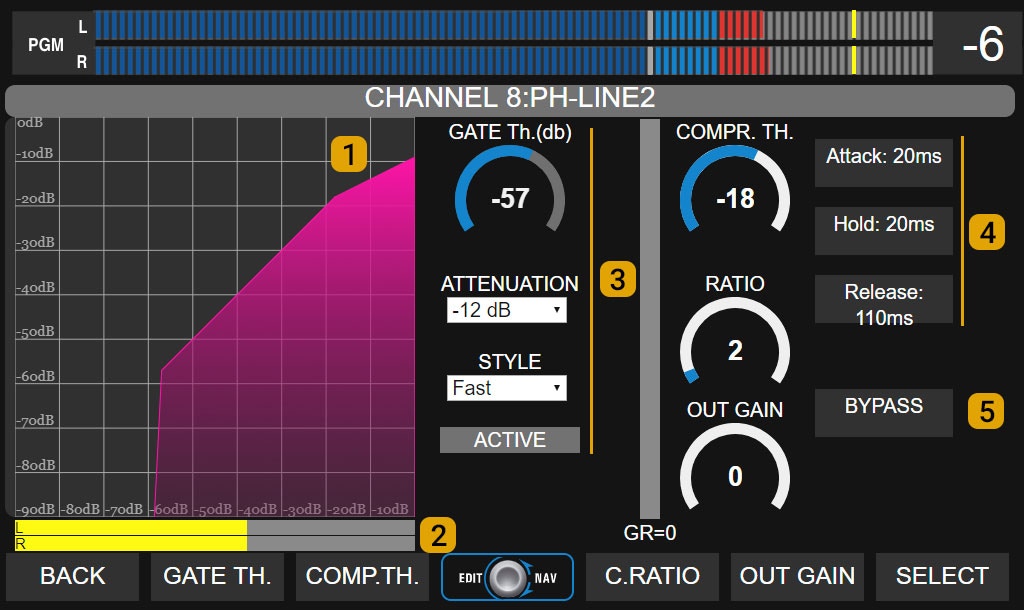
3 - Noise Gate (GATE)
- Threshold: Gate activation threshold (dB).
- Attenuation: Attenuation applied to the signal when the gate is active.
- Style: Changes the recovery time between preset values.
- Active: Indicator that lights up red when the gate is closed.
4 - Dynamic Compressor
Controls for adjusting:- Threshold
- Ratio
- Attack time
- Release time
- Hold
- Output gain
DE-ESSER
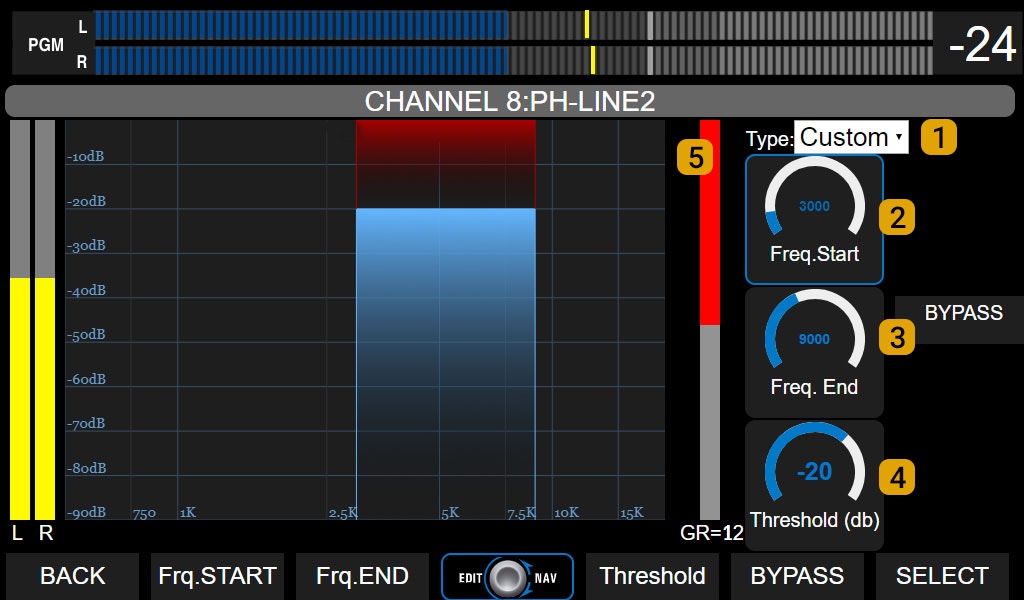
This processor works as a multiband compressor, attenuating only the defined frequency range when the signal level exceeds the set threshold. Controls:
- 1 - Type: Preset adjustments.
- 2 - Frequency start: Lower cutoff frequency. Adjusted according to signal characteristics. Usually between 4,500 and 5,500 Hz.
- 3 - Frequency end: Upper cutoff frequency. Adjusted according to signal characteristics. Usually between 7,000 and 12,000 Hz.
- 4 - Threshold: Threshold level in dB. When the signal in the working band exceeds this value, it is attenuated with a fixed ratio of 15:1.
- 5 - Gain reduction: Indicates the applied level reduction, in dB.