

Main Panel Zones and Controls of the UX24
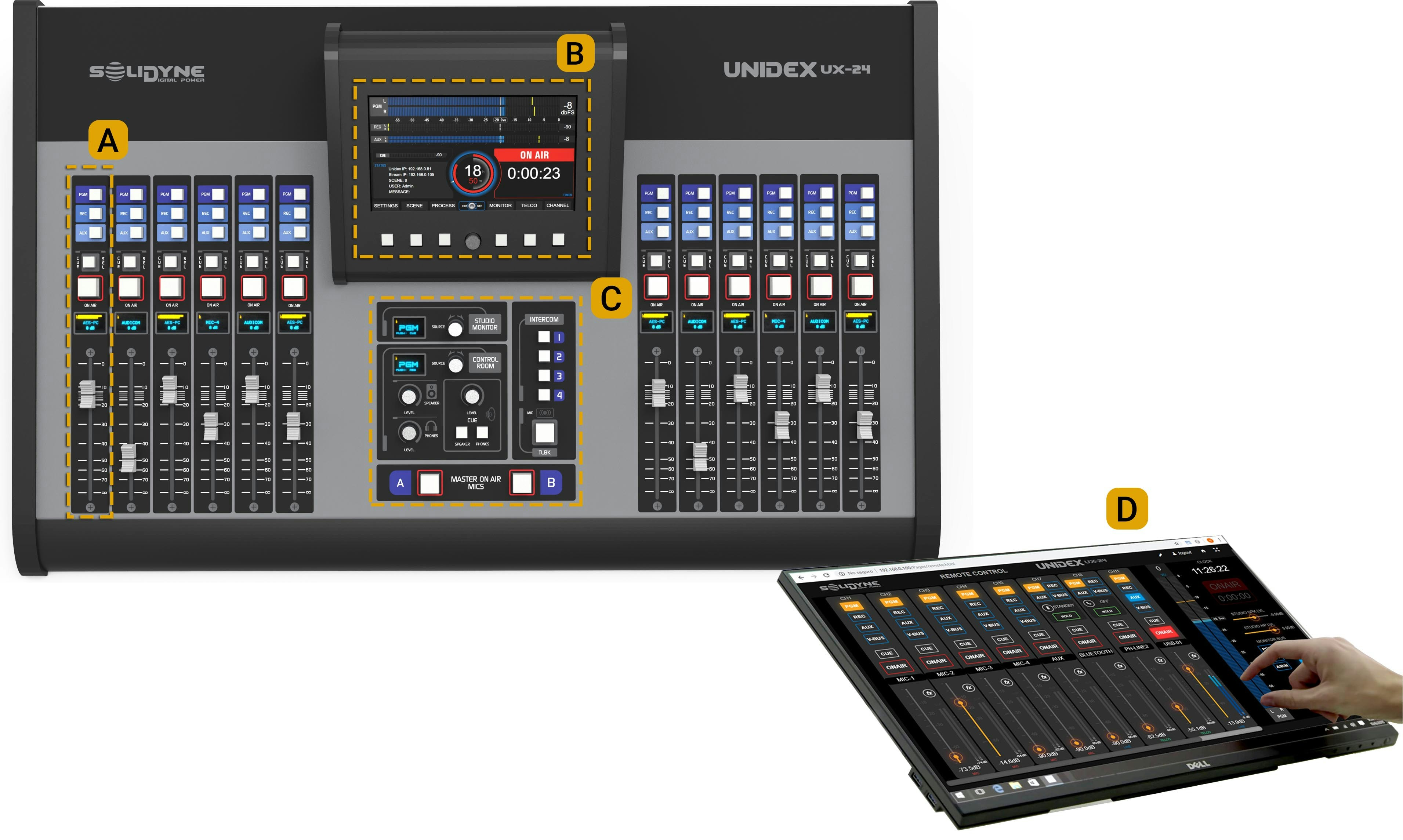
Traditional controls with faders, assignment buttons, on-air and pre-fade listen (PFL).
They operate conventionally and allow direct handling of line communications, VoIP and cellular via Bluetooth (using UNIDEX TELCO adapters). B — Touchscreen
7” display used to operate multiple console functions.
Includes 6 quick-access buttons and a rotary encoder.
Both the buttons and encoder are contextual controls, so their function varies depending on the active screen. C — Monitoring and talkback zone
Area dedicated to monitoring control and the talkback circuit. D — Remote control
Allows remote operation and configuration of the console.
Any computer with a web browser can access the console via its IP address.
Useful for handling virtual channels, using a tablet as a fader extension, or configuring a remote studio.
Main Screen
Level Indicators
The PGM, REC, AUX, and VBUS indicators display:- Average level in VU (slow-moving blue bar).
- Peak level in dBfs (floating yellow segment).
The numerical value on the right indicates the current maximum (in VU or dBfs) and can be toggled by tapping the number.
The main indicator remains visible on all screens and can be switched between buses by tapping the bus name on the left.
CUE Level
Indicates the level of the CUE bus, after the physical level knob.Status
- Unidex IP: IP address for remote control. Enter in a web browser (recommended: Google Chrome) to access the control interface. Requires connection of the Ethernet Remote Control port to the LAN.
- Stream IP: IP address of the streaming module. Enter in a browser to configure streaming services. Requires connection of the Ethernet Streaming port to the LAN.
- SCENE: Name of the currently active scene.
- USER: Active user profile (ADMIN, EXPERT, or BASIC).
- MSG: System messages.
- “+” Advanced: Opens maintenance options (includes shutting down the internal CPU before cutting power).
Master Clock
Displays the current time.Automatically synchronizes when the console is connected to the internet, or manually (see SETTINGS -> SYS CONFIG screen).
On-Air Timer
Starts an ascending count (hh:mm:ss) when microphones are activated. When turned off, the value remains displayed.Context Menu
Six buttons located below the screen provide quick access to main functions.Their function varies depending on the active screen. Navigation and editing are performed using the touchscreen and encoder. Shortcuts on the main screen:
- SETTINGS: Advanced and system configuration (ADMIN only).
- SCENE: Scene management and user profiles.
- PROCESS: Access to equalization, compression, de-essing, and noise gate (available processors vary for each input).
- VIRTUAL: Pressing the encoder accesses the virtual channel control screen (12, 6, or none, depending on UX6 expansions).
- MONITOR: Audio source assignment for Studio and Control Room, with advanced monitoring functions.
- TELCO: Telephone line, Bluetooth, or VoIP management, with level and gain controls.
- CHANNEL: Information and control for the selected channel, including gain, panning, processors, and source reassignment.
Power Saving Mode
The screens turn off after 15 minutes of inactivity.
They reactivate by moving a fader or pressing an Intercom button.