

1
Access the update system
In your browser, enter the console’s IP address followed by the subpath /update.
Example:
Example:
http://192.168.0.121/update2
Check available packages
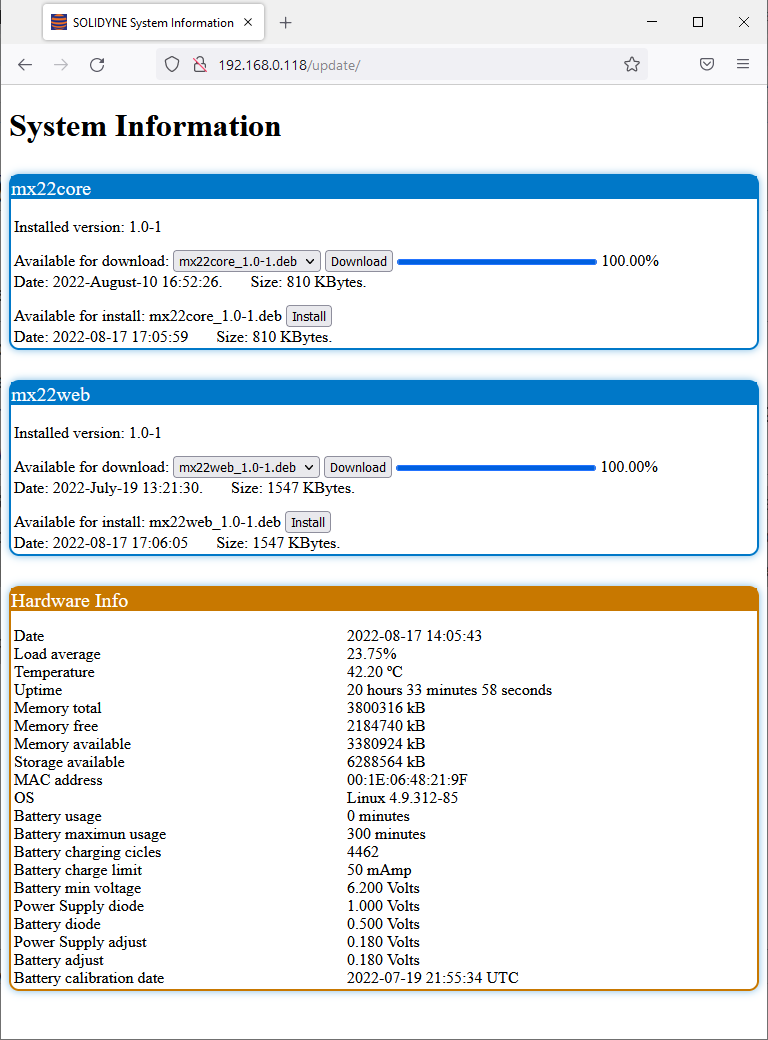
The screen displays the installed software packages and, if available, the latest versions ready for update.
3
Download update
Click Download to retrieve the latest version.
The package is saved to the console’s internal memory.
The package is saved to the console’s internal memory.
4
Install update
Once the download is complete, the Install option becomes available.
Click it to start the installation process.
Click it to start the installation process.
- The console allows updates even via Wi-Fi.
- Since the package is stored locally before installation, the console can complete the installation autonomously.
- The Hardware Info section displays hardware information such as the battery charge cycle count.