

- Subscription is typically based on the number of simultaneous users supported.
- Once access is configured on the console, usage is very simple: the MX2200 just needs to be connected to the Internet and the broadcast started.
- It is an ideal method when mass distribution of the signal is required.
- Start HTTP STREAM
- Reception at the studios
1
Open Connection Center
Turn the encoder to the CONNECTION CENTER screen and press it to enter.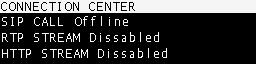
2
Select HTTP STREAM
Navigate with the encoder, select HTTP STREAM and press to open the option.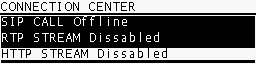
3
Enable the link
On the control screen, select YES to initiate the link with the web server.
When the connection is established, the CONNECTION CENTER and HOME screens will show HTTP STREAM ENABLED.
When the connection is established, the CONNECTION CENTER and HOME screens will show HTTP STREAM ENABLED.
4
Terminate the link
Repeat the procedure and select NO to disable the transmission.
This method is ideal for public streaming of a station or event, allowing global access without the need for specialized software on the listeners’ part.