The RTP connection offers maximum quality and low latency, but requires network configuration at both ends (transmitter and receiver).
It is ideal for fixed installations or locations with known and controlled networks.
Network prerequisites
Ensure you have defined the correct IP/port and have resolved NAT / firewall / port forwarding on the receiver. Without this preparation, the link may not be established.
Start RTP from MX2200
Return from Studios
Reception in Studios (VLC)
1
Open Connection Center
Turn the encoder to CONNECTION CENTER and press it to enter the connection options.
2
Select RTP STREAM
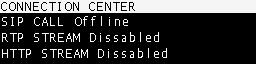
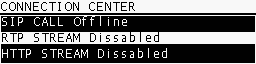
Choose RTP STREAM and press to open the RTP link screen (enable/disable).
3
Enable the link
Select YES to start the RTP link to the studios.When active, the CONNECTION CENTER and HOME screens show RTP STREAM ENABLED.
4
End the link
Repeat the procedure and select NO to disable the RTP.
Before starting, verify that the network and audio format configuration on the MX2200 matches what is expected by the receiver (destination IP, port, codec, and sample rate).
The RTP transmission is unidirectional. Return is typically not used in this mode because the location generates the content without interaction with the studio.
If you need a return (intercom or floor), use a SIP call or a telephone communication (Bluetooth mobile phone or POTS land line) in parallel with the RTP.
To receive the streaming from an MX2200 on a computer, use software with RTP support. VLC Player (free) is recommended.
1
Choose a compatible format
Configure the MX2200 with a format that the receiver supports directly:
PCM16 @ 44.1 kHz (linear)
MP3 (any of the available modes)
OPUS requires an SDP (Session Description) file to describe the content to the player.
2
Open network location in VLC
In VLC Player, go to Media → Open Network Stream.
3
Enter the URL
Use the format:
[protocol]://[source_IP]:[port]
Example:
rtp://0.0.0.0:3030
Where:
rtp is the protocol used by the MX2200.
0.0.0.0 indicates “listen from any incoming IP” on the receiving PC.
3030 is the port configured for reception.
Some versions of VLC also accept: rtp://@:3030
4
Verify firewall/port
Ensure the configured UDP port is allowed in the system firewall and the studio router’s firewall.